Below is a list of steps to allow user to see the attachments that are from the original email including the original email in some setup as well.
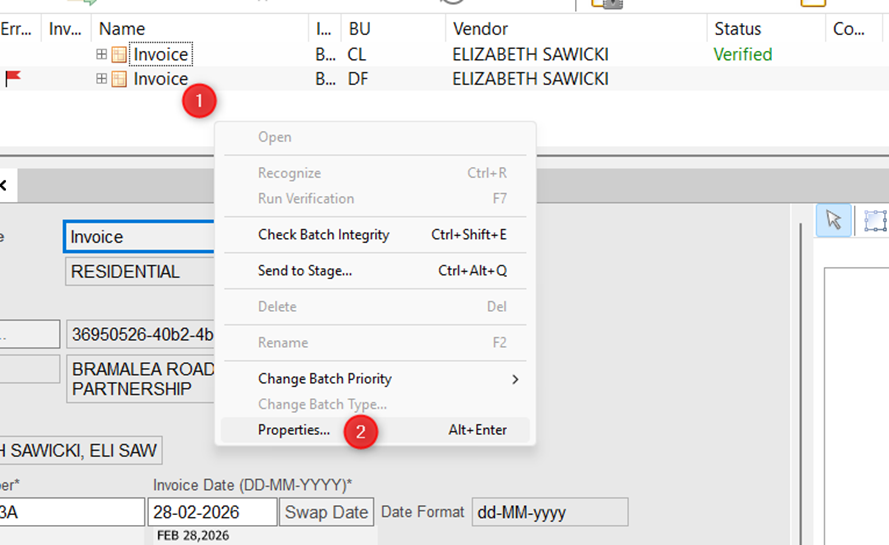
1) Open up the invoice screen, and right click on the white space between the Invoice and the grey line. Select Properties to bring up the Batch Properties.
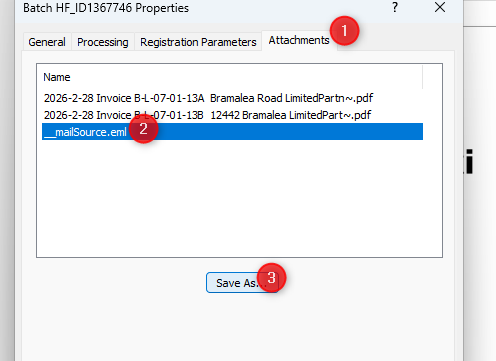
2) Under the Batch Properties, go to the tab "Attachments" and select the attachment or original email (i.e. _mailSource.eml) and click "Save As" to save it on your computer.
Was this article helpful?
That’s Great!
Thank you for your feedback
Sorry! We couldn't be helpful
Thank you for your feedback
Feedback sent
We appreciate your effort and will try to fix the article